


The Glensburg client platform
Glensburg Studio
Follow your planning application stage by stage, approve estimates, pay invoices and keep every document in one secure place, with your whole professional team working from the same record.
Sign in only at studio.glensburg.co.za. Your planner opens your account when we are appointed.
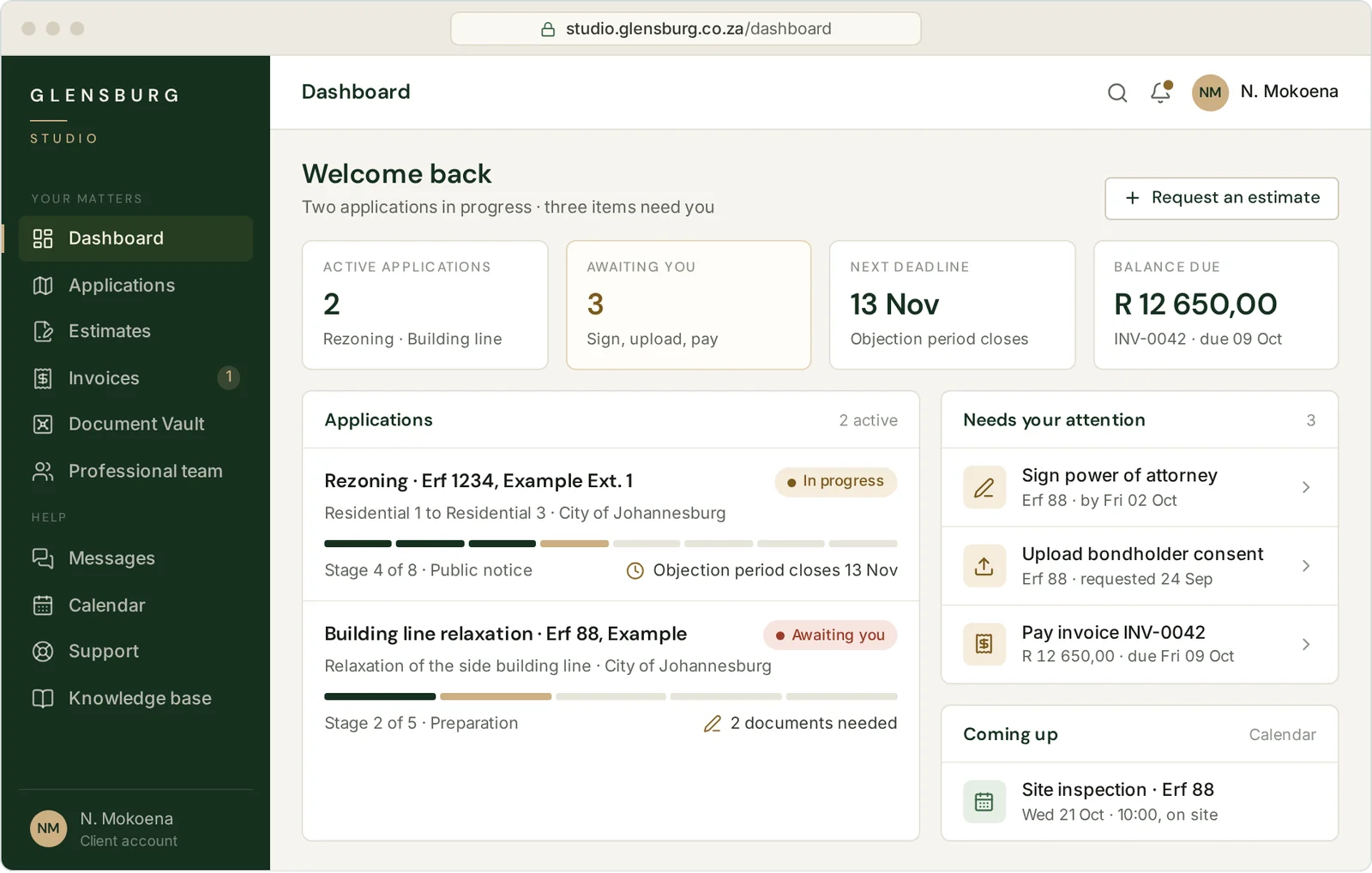
- Opens with every Glensburg appointment
- Matters led by SACPLAN-registered professional planners
- Operated by Glensburg (Pty) Ltd, CIPC 2023/764252/07
What Studio does
One record for your whole application
An application passes through many hands before the municipality decides it: yours, ours, the architect’s, the land surveyor’s, and often a bondholder’s or a body corporate’s. Studio keeps all of it in one place, so the latest drawing, the next deadline and the amount due don’t sit in someone’s inbox.
Application tracker
Every stage, milestone and statutory date on your application, and who is waiting on whom.
How it worksEstimates and approvals
Review an itemised estimate, ask questions on it, then accept and sign it online.
How it worksInvoices and payments
Invoices tied to your matter and payable online, with your payment history alongside.
How it worksDocument Vault
Secure uploads for title deeds, consents and plans, kept for you to download for three years.
How it worksProfessional team
Your architect, engineers and land surveyor on one record, each with the access their role needs.
How it worksMessages and support
Messages, support requests, meeting dates and plain-language guidance, all kept with your matter.
How it works
Built around the process
Organised the way applications actually move
Planning applications do not move like ordinary projects. They pass through statutory stages, with notice periods and appeal windows that run to fixed clocks. Each matter in Studio is set up against the stages its application will pass through, so what you see follows the process the municipality applies.
- 1
Instruction
Estimate accepted and appointment signed online.
Estimates - 2
Preparation
Title documents, consents and drawings gathered in one place.
Document Vault - 3
Lodgement
Application lodged and the municipal reference recorded.
Tracker - 4
Public notice
Notices served and advertised; the objection period tracked.
Tracker - 5
Response
Objections answered and further information supplied.
Team - 6
- 7
Decision
Decision recorded with its dispatch date; the appeal period tracked.
Tracker - 8
Close-out
Conditions met and approval documents kept for three years.
Document Vault
Not every matter passes through every stage. Many applications are decided without a hearing, and some need stages beyond these, such as the proclamation of a new township.
Application tracker
Where your application stands, without having to ask
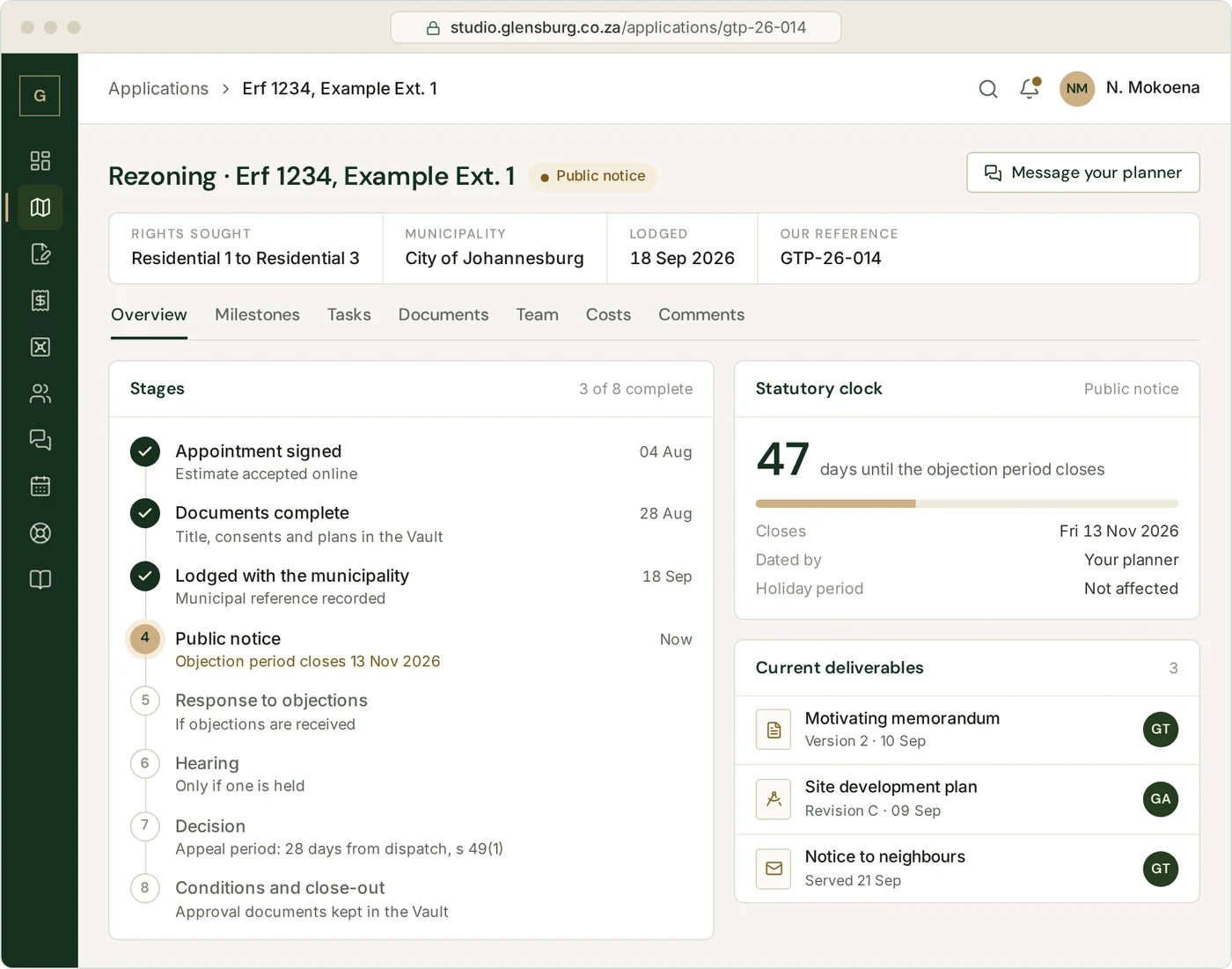
Each application is a matter in Studio with its own record: the erf, the rights sought, the municipal reference number and the stages still ahead. Milestones show what has happened and what comes next, with dates. Tasks show who is waiting on whom, including the signatures and consents we need from you.
- Stages and milestones, each with its date
- Your own task list: what we need from you, and by when
- The current memorandum, plans and notices beside the stage they belong to
- A timeline of the whole matter, and the fees invoiced and paid on it
Statutory clocks
Dated from the event the by-law counts from
Planning periods do not all run the same way. Under the City of Johannesburg Municipal Planning By-law, 2016, as amended in 2023 (Local Authority Notice 447 of 2024, Gauteng Provincial Gazette 117, 3 April 2024), an internal appeal against a decision must be lodged within 28 days from the date the notification of the decision is dispatched, not the date it is received (s 49(1)). A neighbour objecting to a building line relaxation has 14 days from receipt of the letter (s 20(2)(a)(cc)).
Your planner dates each clock in Studio from the event the By-law counts from, and allows for the period between 15 December and 5 January, which the By-law excludes when prescribed days are calculated (s 1). Where the By-law leaves a count open, we work to the earlier date.
Other municipalities set their own periods in their own by-laws. Each matter is dated under the by-law that governs it.
Estimates and approvals
Scope and fees agreed before work starts
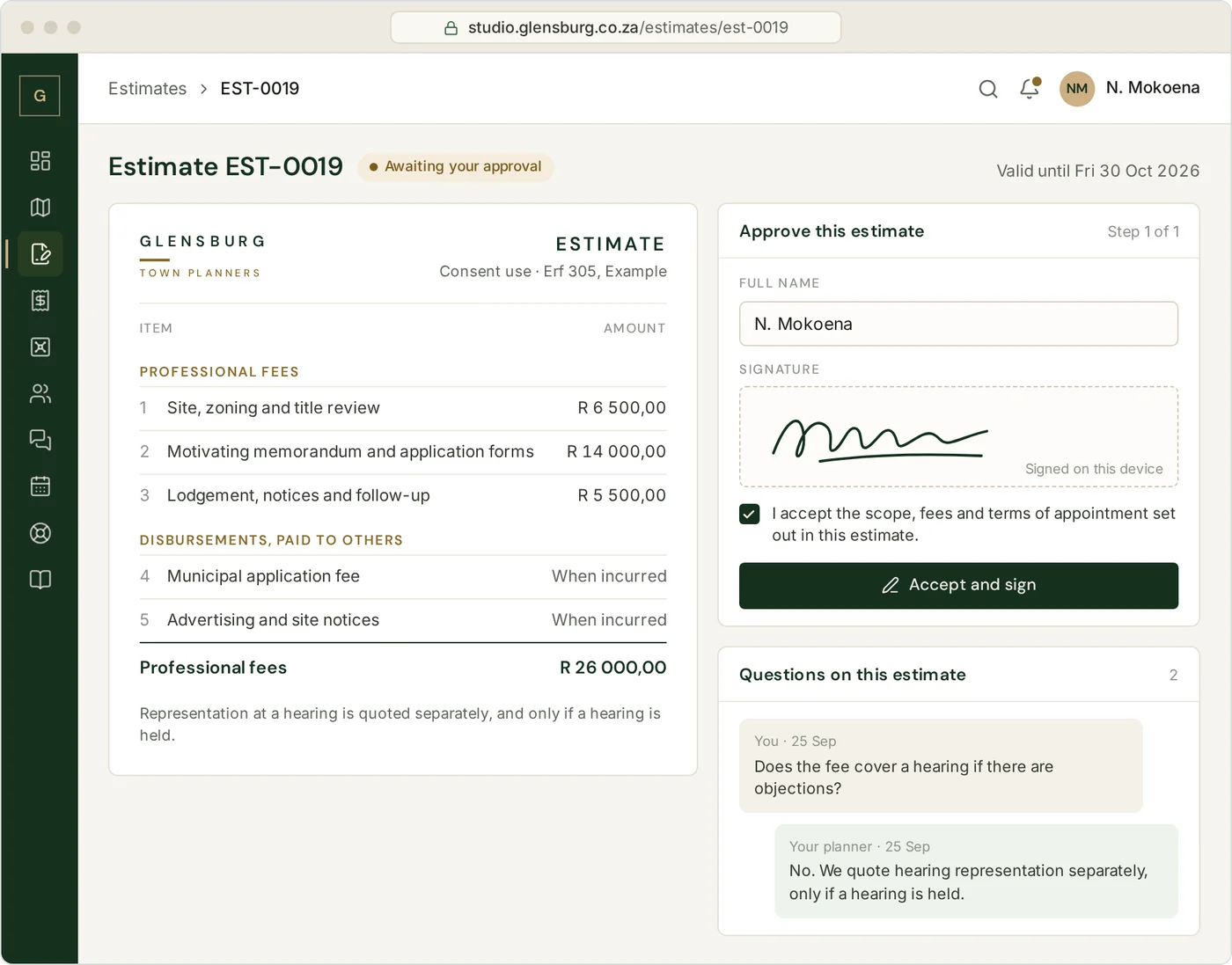
Your estimate arrives in Studio with the work set out line by line, and our professional fees kept apart from disbursements, the amounts paid to others such as the municipality’s application fee and the cost of advertising. Ask questions on the estimate itself, then accept it by typing your name and signing on screen.
Larger matters, such as a township establishment, receive a full proposal setting out the approach, the programme and the professional team. The appointment letter is signed the same way, so the signed terms of your instruction stay with your matter.
- Professional fees and disbursements listed separately
- Questions and answers kept on the estimate
- Accept and sign on a phone or a computer
- Existing clients request estimates for new work from the dashboard
Invoices and payments
Invoices you can check, and pay online
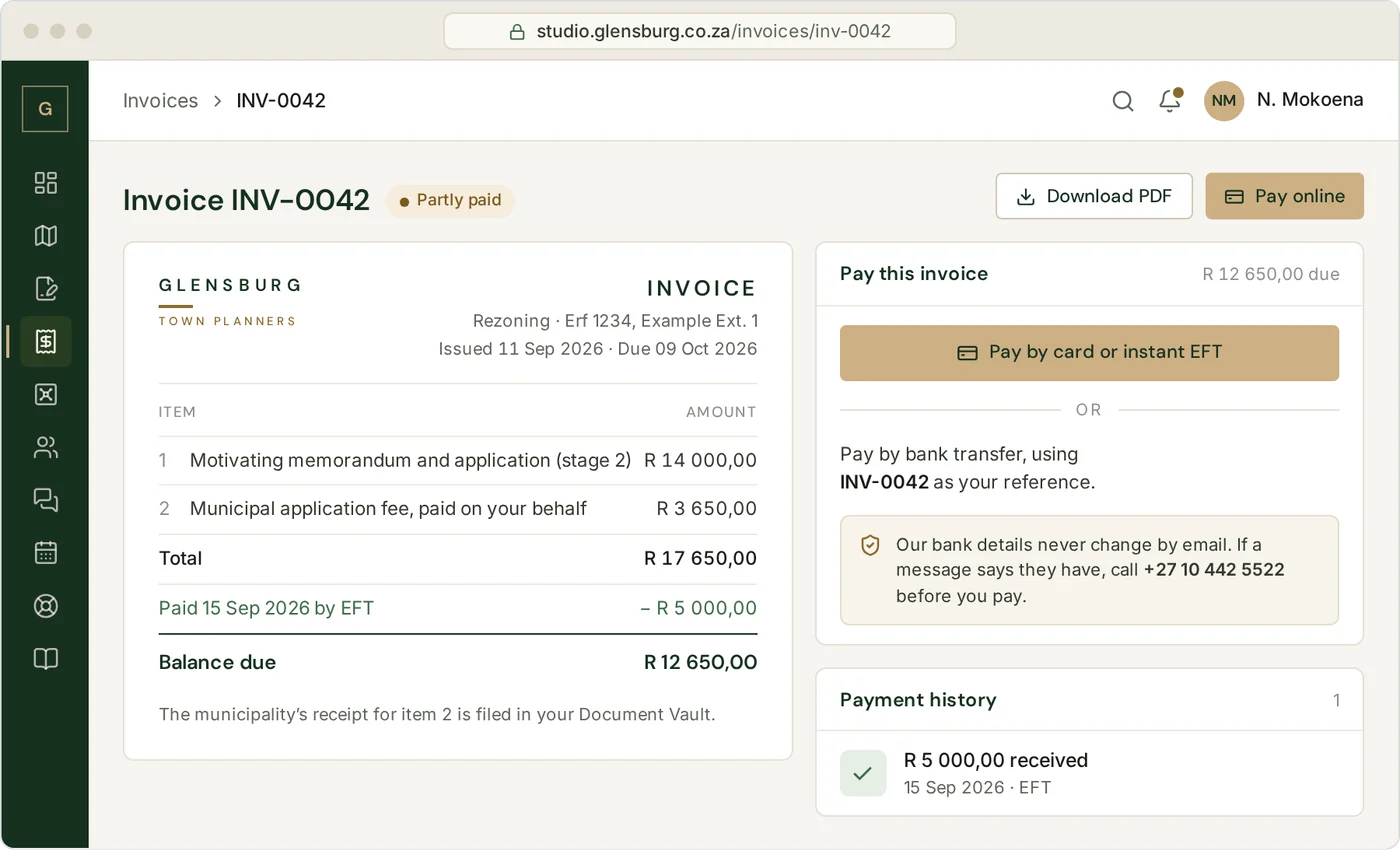
Every invoice is issued in Studio against the matter it relates to, so you can see what you are paying for before you pay it. Pay online by card or instant EFT, or by bank transfer with the invoice number as your reference. Each payment is recorded against its invoice, and your billing page shows what has been invoiced, what has been paid and what is still due across all your matters.
- Each invoice linked to its matter
- Card details entered with our payment provider, never stored in Studio
- Deposits and part-payments recorded against the invoice
- A PDF of every invoice for your records
Our bank details never change by email
We will never tell you about new bank details by email or WhatsApp. If a message says our details have changed, check the invoice in Studio and call us on +27 10 442 5522 before you pay.
Document Vault
Every document secure, and to hand for three years
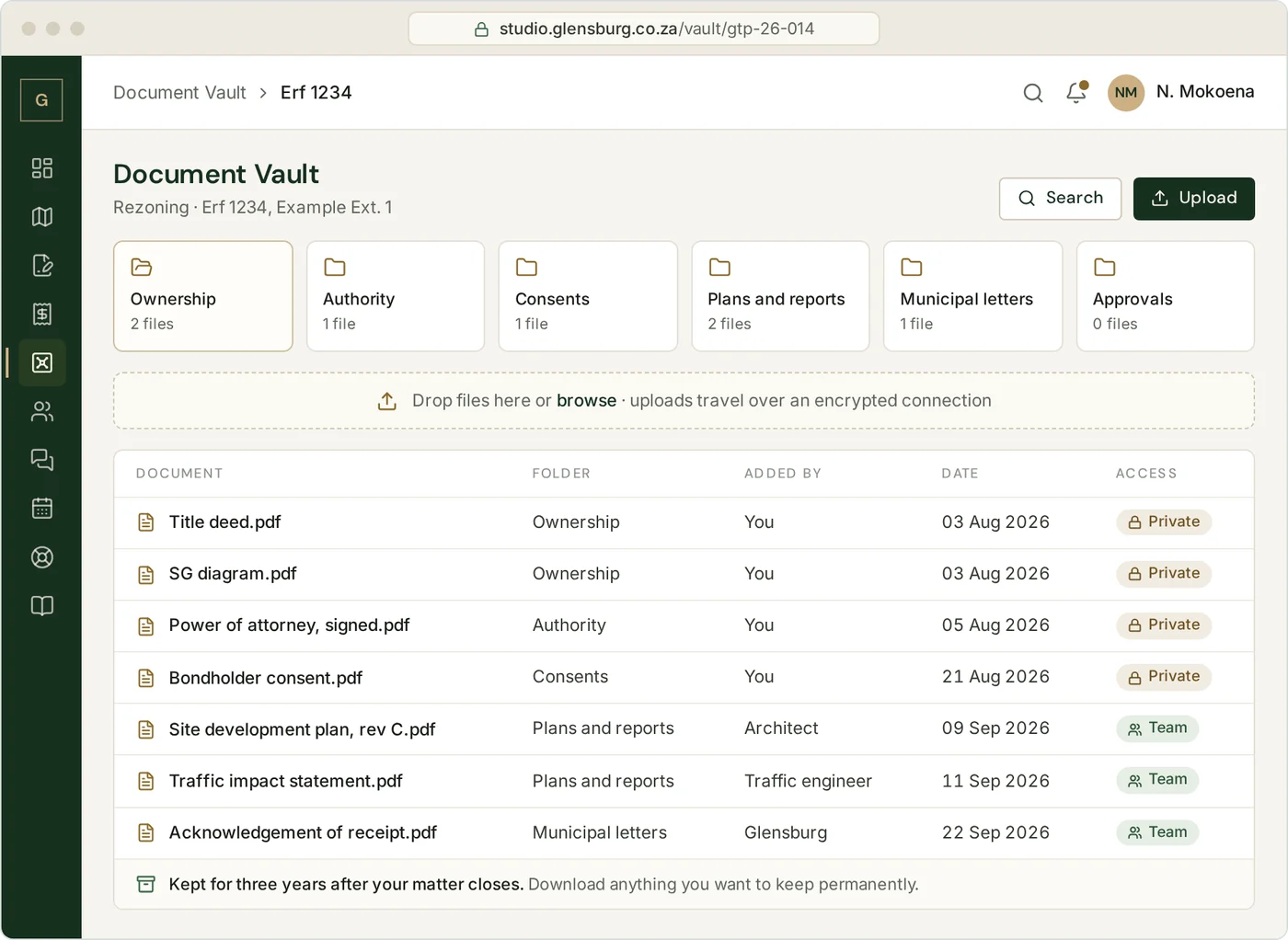
Planning applications need documents you would rather not send as email attachments: title deeds, SG diagrams, powers of attorney, company resolutions, and consents from bondholders or bodies corporate. In Studio you upload them to your Vault over an encrypted connection, where only you and the Glensburg team on your matter can open them.
Approval letters, conditions of approval and final plans are filed in the same place. When a buyer, a bank or a building plans examiner asks for them after the application is decided, you download them yourself.
- Upload from a computer by drag and drop, or straight from your phone
- Filed by matter and by type of document
- Personal documents private to you and us; working drawings shared with your team
- Available to download for three years after your matter closes
What happens after three years
We delete the Vault copies, unless you ask us to keep them or the law requires a longer record, as the Protection of Personal Information Act 4 of 2013 expects. [We remind you before anything is deleted.]
Professional team
Every professional on your project, on one record
Most applications need more than a planner. The architect draws the site development plan, engineers report on services and traffic, a land surveyor prepares the diagrams, and a conveyancer registers what the approval allows. In Studio they join your matter as named users, so the drawing the engineer reports on is the drawing we submit.
Glensburg planner
Leads the application and sets its stages and statutory dates.
Runs the matterYou, the owner or developer
Approves estimates, signs, pays and sees every stage.
Everything on your matterGlensburg architect
Site development plan and building drawings, where we prepare them.
Drawings and plansLand surveyor
Surveys and diagrams for subdivision, consolidation and township layouts.
Working documentsAt the centre
Your matter
One record of stages, drawings, reports and decisions, with the current version of each in one place.
Civil engineer
Services reports on water, sewer, stormwater and roads.
Working documentsConveyancer
Title conditions, and registration once the approval allows it.
Documents you releaseTraffic engineer
Traffic impact assessments, access and parking.
Working documentsEnvironmental and heritage practitioners
Specialist reports, where the site or the scheme calls for them.
Working documentsPlanning and architecture are both in-house at Glensburg. Outside specialists, whether you appoint them or we recommend them, join your matter in the same way.
Consultants see the matters they work on and the working documents for them. Your personal documents, your invoices and your other matters stay out of their view.
Communication and support
Questions answered where the work is
Every conversation about your application is kept with it, alongside the documents it refers to. Studio also emails you when something needs your attention, so you need not sign in just to check.
Messages
Write to your planner from inside your matter, and keep the whole thread, attachments included.
Support requests
Raise a request, from a sign-in problem to a question about an invoice, and see who is handling it.
Calendar
Site inspections, meetings and hearing dates appear in your calendar, with what you need to attend.
Knowledge base
Plain-language notes on each stage of an application, written by our planners.
Messages and support requests are answered within one working day, the same standard we keep for every enquiry.
Security and your information
How we protect what you share with us
Studio holds title documents, identity details and information about your property. We handle them the way the Protection of Personal Information Act requires: collected for your matter, protected while we hold them and deleted once the purpose is served.
Encrypted connection
Studio is served only over HTTPS, so your password and your documents travel encrypted between your device and Studio.
Your own account
Every person signs in with their own email address and password. Accounts are never shared, and access ends when a person’s role on your matter ends.
Two-step sign-in
[A one-time code sent to your email confirms it is you when you sign in from a new device.]Access by role
Consultants see only the matters they work on. Your personal documents and invoices stay between you and us.
Where Studio is hosted
Studio runs on servers in Amsterdam, the Netherlands, provided by InMotion Hosting. Your information goes there only on the terms section 72 of the Act allows for transfers outside South Africa. [Encrypted backups are made daily and kept for 30 days.]
Kept, then deleted
Vault documents stay available for three years after your matter closes, then are deleted unless you ask us to keep them or the law requires a longer record.
No online system is free of risk. If we have reason to believe that your personal information has been accessed or acquired by someone without authority, we will tell you and the Information Regulator, as section 22 of the Act requires.
Getting started
From first call to first sign-in
- 1
Speak to a Planner
Call us, email us or send the contact form. The first consultation is free and carries no obligation.
- 2
Receive your estimate
It arrives by email with a link to review it in Studio, with professional fees and disbursements set out separately.
- 3
Accept and sign online
We then open your matter, send your invitation to Studio and invite the professionals you want involved.
- 4
Follow it through
Track each stage, upload documents and pay invoices as the application moves. The approval documents stay in your Vault for three years after close-out.
Studio comes with every Glensburg appointment[, at no extra cost].
Already a client
Signing in to Studio
- Go to studio.glensburg.co.za and sign in with the email address we registered for you.
- Signing in for the first time? Use the link in your invitation email to set your password.
- Forgotten your password? Choose “Forgot password” on the sign-in page.
- Still stuck? Email planning@glensburg.co.za or call +27 10 442 5522.
We will never ask for your Studio password. A genuine sign-in link always begins with https://studio.glensburg.co.za/. If it does not, do not click it.
Questions
Answers about Studio
If your question is not answered here, ask your planner or call us on +27 10 442 5522.
Reviewed 28 September 2026 by Glensburg Town Planners
What does Studio cost?
Does Studio replace the municipality’s records?
No. The municipality keeps the official record of your application. Studio shows our record of your matter: what we have lodged, what the municipality has told us and what happens next.
Who can see my documents?
You, anyone you add to your account, the Glensburg team on your matter and any consultants you agree to. Consultants get the working documents for the matters they are working on, and nothing else: not your personal documents, not your invoices, not your other matters.
Can my architect, engineer or land surveyor use Studio?
Yes. Tell your planner who should join, and we invite them to your matter as named users[, at no charge to them]. If they work with us on more than one matter, their access is set separately for each.
Can a colleague or family member sign in too?
Yes. Ask your planner to add them and we will send each person their own invitation. Everyone you add sees everything on your account, including its documents and invoices, so add only people you are happy to share all of it with.
Do I have to use Studio?
No. Estimates, invoices and anything else that needs a decision from you also reach you by email, and your planner is a phone call away. Studio is simply the quickest way to see progress for yourself.
How long do you keep my documents?
Three years from the day your matter closes. Until then you can download anything you want to keep for good, or ask us to hold it for longer. After that, the Vault copies are deleted unless the law requires us to keep them.
How do I pay an invoice?
Open the invoice in Studio and choose to pay online. You pay by card or instant EFT on our payment provider’s page, so your card details never reach Studio. For a bank transfer, use the invoice number as the reference. If anyone tells you our banking details have changed, call us before you pay.
Can I use Studio on my phone?
Yes. Studio works in any current browser on a phone, tablet or computer, and you can upload a document straight from your phone.
Did Glensburg build Studio?
Studio runs on an established, commercially licensed project-management system. We have configured it around planning applications: the stages, statutory dates, documents and professional roles described on this page. The planning work it records is ours.